Microsoft insists you to use a Microsoft account when setting up a brand-new Windows PC, but what if you don’t want to? Fortunately, Windows 11 (Home 24H2) works in the same way previous Windows 11 iterations used to–without a Microsoft account or the need to go online. It’s not straightforward however, and you need to pull off a couple of simply technical tricks to make it happen when you’re setting up your computer.
The best way to do this is to use the official ISO file from Microsoft to install Windows 11 24H2 or create a USB stick for the installation. You can do this with official tools and sources from Microsoft. Additional tools aren’t even necessary, as everything can be done during the installation.
How to reinstall Windows 11 24H2 on your PC or notebook
Regardless of which Windows 11 24H2 installation files you use to install the operating system on your PC or notebook, select the “Install Windows 11” option under “Select setup option.”
Continue the installation until you reach the point where you need to enter a Microsoft account to log in to Windows 11 Home.
Now press the key combination Shift + F10. If you’re installing Windows 11 on a notebook, you may need to press Shift + Fn + F10. A command prompt will open in which you’ll need to create a local user in Windows. To do this, use the following command:
net use “thomas” /add
Instead of “thomas,” enter your user name. The user name must be different from the name of the PC that you entered previously. Then add your user to the local administrator’s group:
net localgroup “Administrators” “thomas” /add
Use the previously created user name here as well. Then enter the following commands to prepare and restart the PC:
cd oobe
msoobe.exe && shutdown -r
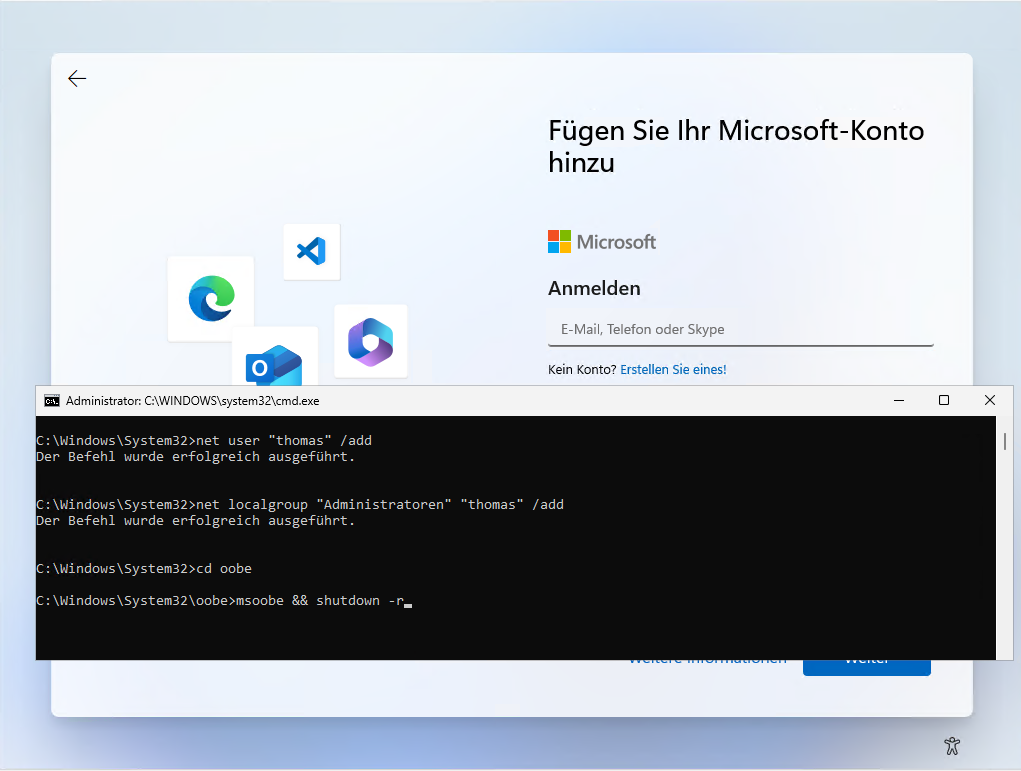
Windows 11 will restart and display the following message: “The user name or password is incorrect.” Confirm this with OK. In the new window, select the user account that you created previously at the bottom. You can now complete the installation wizard like a conventional installation.
After a short time, the installation is complete and you can start working with Windows 11 Home.
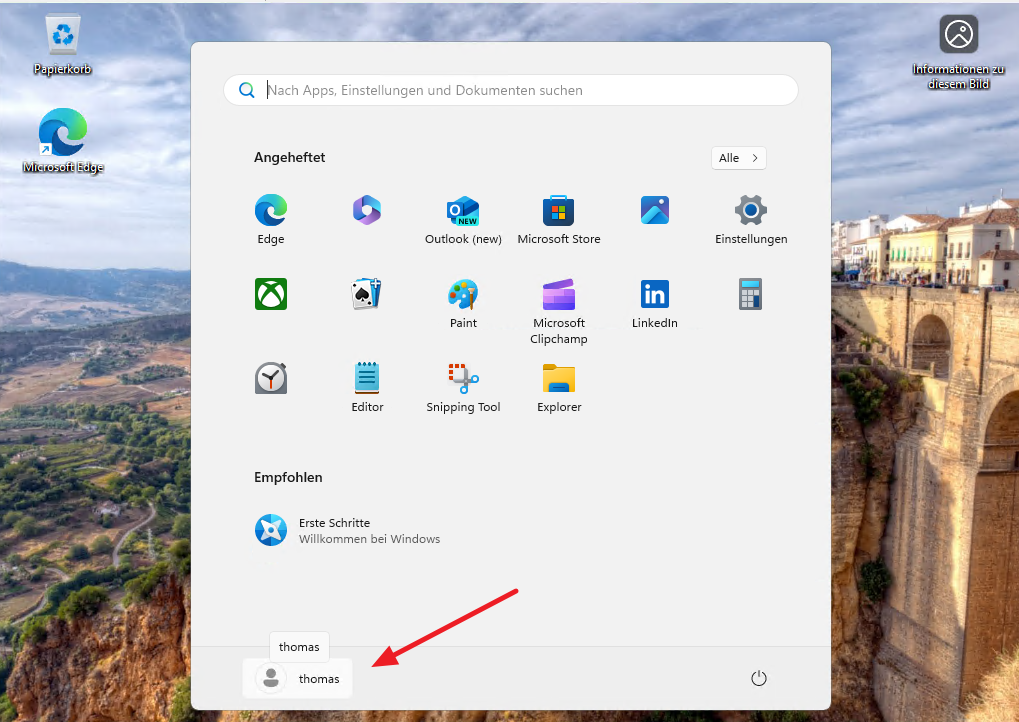
If you want to use a Microsoft account, click on “Sign in” in the Windows 11 settings on the start page under “Everything is there with your Microsoft account.”
You can still assign a password to your local user account. To do this, enter “cmd” via the search field in the Start menu using the context menu with administrator rights and enter the following command:
net user thomas test
The command assigns the password “test” to the example user “thomas. Here, of course, you enter your user account and password that you want to use.

19 Comments
Ahmedabad · 08/03/2026 at 10:47 PM
I enjoy what you guys are up too. This sort of clever work and coverage!
Keep up the good works guys I’ve added you guys to our blogroll.
johny · 08/04/2026 at 3:31 PM
Thanks
Dalhousie · 12/03/2026 at 3:32 AM
I wanted to thank you for this excellent read!! I absolutely loved every
bit of it. I’ve got you book-marked to look at
new things you post…
Ahmedabad · 13/03/2026 at 11:34 AM
Write more, thats all I have to say. Literally, it
seems as though you relied on the video to make your point.
You clearly know what youre talking about, why throw away your intelligence on just posting videos to your blog when you could be giving us something enlightening to read?
สล็อตเว็บตรง · 16/03/2026 at 12:37 PM
It’s appropriate time to make a few plans for the long run and it is time to
be happy. I’ve read this publish and if I may I desire to recommend you some attention-grabbing things or advice.
Maybe you can write subsequent articles referring to this article.
I wish to read more things approximately it!
Kolkata · 17/03/2026 at 4:28 PM
It’s amazing to pay a visit this site and reading the views of all friends regarding this post,
while I am also keen of getting knowledge.
Manali Girl · 18/03/2026 at 9:21 AM
Marvelous, what a blog it is! This web site gives helpful data to
us, keep it up.
สล็อต · 28/03/2026 at 4:23 PM
Hi, after reading this awesome piece of writing i am also delighted to share my experience here with colleagues.
johny · 08/04/2026 at 3:18 PM
Looking forward to reading your comments on my other articles
johny · 08/04/2026 at 3:31 PM
Great.
I hope that you will enjoy our other articles too
oneupmultiverse · 04/04/2026 at 11:37 PM
This is very attention-grabbing, You are an overly professional blogger.
I’ve joined your feed and look forward to in the hunt for
extra of your fantastic post. Also, I’ve shared your web site in my social networks
johny · 08/04/2026 at 3:14 PM
Thank you. Let us know what topic you like us to cover in future posts.
สล็อตวอเลท · 09/04/2026 at 10:01 PM
It’s really a great and helpful piece of info. I’m happy that you just shared this useful info with us.
Please keep us up to date like this. Thank you for sharing.
เว็บสล็อต · 11/04/2026 at 5:22 PM
Hi there to every one, the contents existing at this web page are in fact amazing for people experience, well, keep up the good work fellows.
สล็อตวอเลท · 11/04/2026 at 6:23 PM
naturally like your web site however you have to
test the spelling on several of your posts.
A number of them are rife with spelling issues and I
to find it very troublesome to inform the truth then again I will definitely
come back again.
สล็อตเว็บตรง · 13/04/2026 at 9:05 AM
Everything is very open with a really clear description of the challenges.
It was truly informative. Your site is very useful. Thanks for sharing!
สล็อตเว็บตรง · 17/04/2026 at 7:53 AM
Greate post. Keep posting such kind of info
on your blog. Im really impressed by your blog.
Hey there, You have performed a great job. I will certainly digg it
and for my part recommend to my friends. I am sure they will be benefited
from this web site.
เว็บสล็อต · 17/04/2026 at 9:43 AM
Hey! I know this is kind of off topic but I was wondering which
blog platform are you using for this site? I’m getting tired of WordPress because I’ve had issues with hackers and I’m looking at options for another platform.
I would be awesome if you could point me in the direction of
a good platform.
สล็อต · 18/04/2026 at 1:05 AM
I like the valuable information you provide
to your articles. I’ll bookmark your weblog and take a look
at again here regularly. I’m quite certain I’ll be informed plenty
of new stuff proper right here! Best of luck for the
next!