In today’s digital age, computers have become an integral part of our daily lives. However, even the most reliable machines can encounter issues from time to time. This guide will walk you through some of the most common computer problems and provide simple solutions to get your system back up and running smoothly.
Slow Performance
One of the most frequent complaints among computer users is slow performance. This can be frustrating and significantly impact productivity.
Causes:
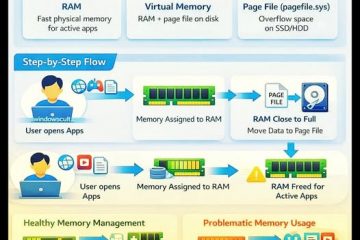
- Insufficient RAM
- Full hard drive
- Too many background applications
- Malware infections
Solutions:
- Close unnecessary background applications
- Run a malware scan
- Free up disk space by deleting unnecessary files
- Consider upgrading your RAM or switching to an SSD for a speed boost
Blue Screen of Death (BSOD)
The dreaded Blue Screen of Death can be alarming, but it’s often resolvable with some simple troubleshooting.
Causes:
- Driver conflicts
- Hardware issues
- Software conflicts
Solutions:
- Identify the error code displayed on the blue screen
- Update or roll back problematic drivers
- Check for hardware issues, especially with your RAM
- Run a system diagnostic to identify potential problems
Software Crashes
Frequent software crashes can disrupt your workflow and lead to data loss if not addressed promptly.
Causes:
- Outdated software
- Conflicts between programs
- Insufficient system resources
Solutions:
- Keep your software updated to the latest version
- Resolve conflicts between programs by closing unnecessary applications
- Consider reinstalling or repairing the problematic software
Internet Connection Issues
In our connected world, losing internet access can be a major inconvenience.
Causes:
- Router or modem problems
- Network settings issues
- ISP outages
Solutions:
- Restart your router and modem
- Check your network connections
- Reboot your PC
- Contact your ISP if the problem persists
Overheating
Overheating can lead to performance issues and even hardware damage if left unchecked.
Causes:
- Dust accumulation
- Poor ventilation
- Malfunctioning cooling components
Solutions:
- Clean dust from vents and fans
- Ensure proper ventilation around your computer
- Consider additional cooling solutions like cooling pads or fans
Hard Drive Issues
Hard drive problems can lead to data loss and system instability.
Causes:
- Physical damage
- Logical errors
- Failing hardware
Solutions:
- Run disk error checks
- Backup important data regularly
- Consider replacing a failing hard drive
Unresponsive Software
When software becomes unresponsive, it can bring your work to a standstill.
Solutions:
- Force close the unresponsive software using Task Manager
- Update the software to the latest version
- Reboot your PC if the problem persists
Loud Noises from PC
Unusual noises coming from your computer can indicate hardware issues.
Causes:
- Loose components
- Malfunctioning fans
- Failing hard drive
Solutions:
- Check for loose components and tighten them if necessary
- Remove obstructions from cooling fans
- Consider repairing or replacing malfunctioning hardware
Computer Won’t Boot
A computer that won’t start can be particularly frustrating.
Causes:
- Power supply issues
- Hardware failures
- Corrupted operating system
Solutions:
- Check all power connections
- Test the power supply
- Try booting in Safe Mode to diagnose software issues
Printer Problems
Printer issues can disrupt your ability to produce physical documents when needed.
Solutions:
- Check ink or toner levels
- Update or reinstall printer drivers
- Ensure proper connection settings
Conclusion
While computer problems can be frustrating, many common issues have simple solutions. By following these troubleshooting steps, you can often resolve problems quickly and get back to your tasks. Remember to always back up your important data regularly to prevent loss in case of more serious issues. If problems persist or you’re unsure about any steps, don’t hesitate to seek professional help.

0 Comments